
- Log in to your Admin account
- From the main navigation, select Content
- In the top right, click Create
- Select Generate with AI
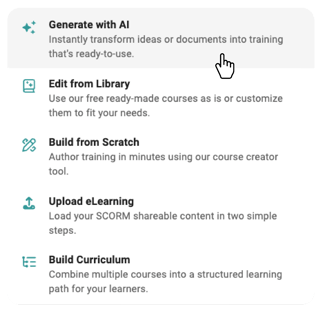
- In the Source-to-Course window, complete the following:
- Describe your Course
Click into the description field and type a clear summary of the course you want to create - Course Objectives
Enter the key outcomes or skills learners should gain
Select Add Objective (if applicable) to include multiple objectives - Image Style
Choose your preferred visual style from the available options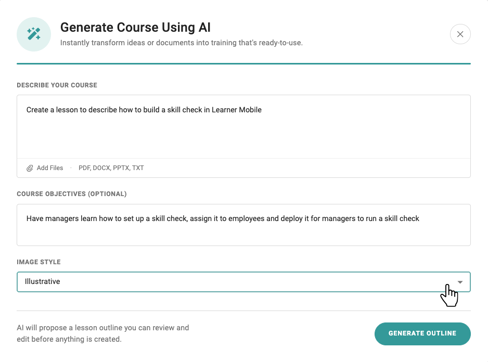
- Once all fields are complete, click Generate Outline
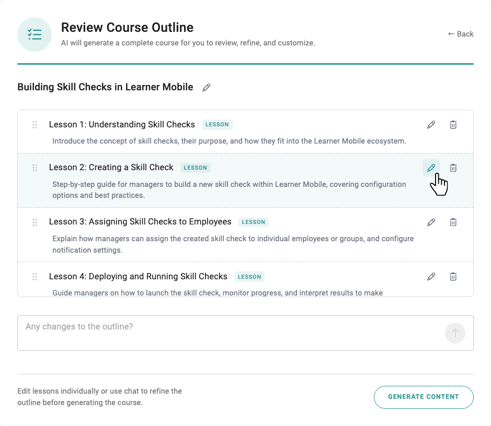
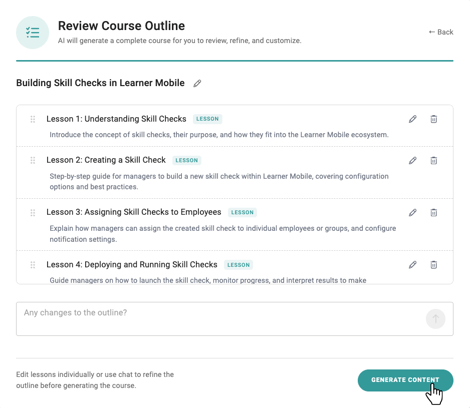
- Review the generated outline, including lessons and quizzes
- To make edits:
- Select the pencil icon in the top right corner of any lesson or quiz card
- Update text, structure, or questions as needed
- Save your changes
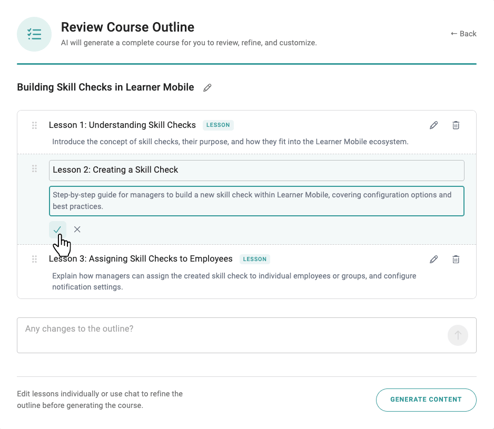
- If the outline looks right, click Generate Course
You will be taken to the Course Builder, where you can fully customize your course. Add new elements, remove sections, adjust content, and refine the experience to match your training needs.
Next Step
Check out How to Use the Course Builder to learn how to customize and finalize your course.